Showing posts with label apk downloader. Show all posts

Monday, 13 August 2012

WeChat for Android/Iphone/Symbians/Windows Phone Download


WeChat Apps for Android/Symbians/Iphone/Windows Phone 

What is WeChat?

WeChat is a fashionable and new mobile communication tool. It supports sending voice, video, photo and text messages. You can also start group chatting and find people nearby according to location data. It works on iOS, Android and Symbian devices.

What can WeChat do?

With WeChat, you can chat with your friends instantly via voice messages, as well as texts and images. You can also create a group chat to chat with several friends together.

Is WeChat free?

It's free to download, install and use WeChat. However, you may need to pay your carrier for internet service.

Is there any distance restriction for voice messages?

No. You can chat with friends anywhere.

How to register?

You can login to WeChat with your Facebook account or sign up with your phone number.

I've entered the correct password but got a "wrong password" notice.

You are using WeChat 3.5 or older version. Please upgrade to the latest version.

How to retrieve my password?

Click "Forgot Password?" in login page and follow the instructions.

Will WeChat contacts see my phone number?

No, your phone number will not be shown on WeChat.

What's the difference between WeChat ID and WeChat Nickname?

WeChat ID is your unique ID in WeChat. Wechat ID can be changed once only. Nickname is your name shown to other WeChat users, and it can be changed whenever you like.

How can I find my friends?

You can search them via their WeChat IDs directly or find who are using WeChat in Recommend.

How to delete message history?

You can delete a single message or the entire conversation. For touch-screen mobile, just tap and hold the message or conversation. For keyboard mobile, please select Options -> Delete.

How do I know whether my message is read by the recipient?

Sorry, there is no way to know about that. This is privacy information of the other user and we cannot disclose this information.

Homepage : http://www.wechatapp.com/
Sunday, 22 July 2012

Real APK Leecher


Real APK Leecher, the easiest way to download android apk file from Android Market to desktop


Real APK Leecher is a Java application that help you download a bunch of Android apps from Market to desktop with minimum actions.
My work is required to always update the latest software to customers. It took a lot of time to show customers to use their own Gmail to sign in and download apps from Android Market. The easier way is just install apk files from desktop to their phone. But it’s not like you can always get the latest version apk files from Google. Luckily! I found a great API android-market-api provided by Tim Strazzere and decided to build a tool using this API for my purpose. Think of it, this tool might be useful to others too. So i share it here. The very first word, i wanna say thanks to Tim Strazzere for his great work.


Real APK Leecher v1.3.5
logo Real APK Leecher, the easiest way to download android apk file from Android Market to desktop

How to use

1. Config the option
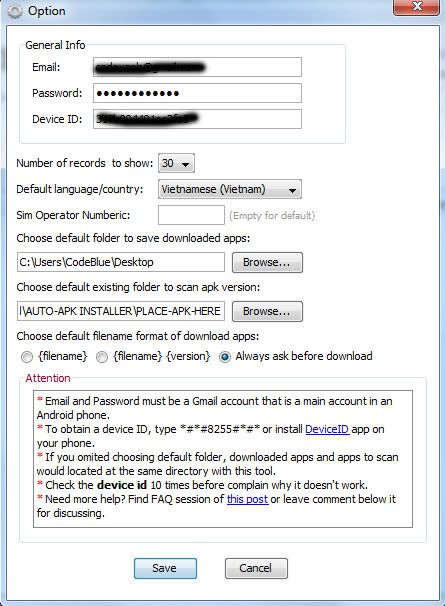
First time launching Real APK Leecher, you need to config some required information for the tool to work. Go to Edit -> Option.
real apk leecher option Real APK Leecher, the easiest way to download android apk file from Android Market to desktop

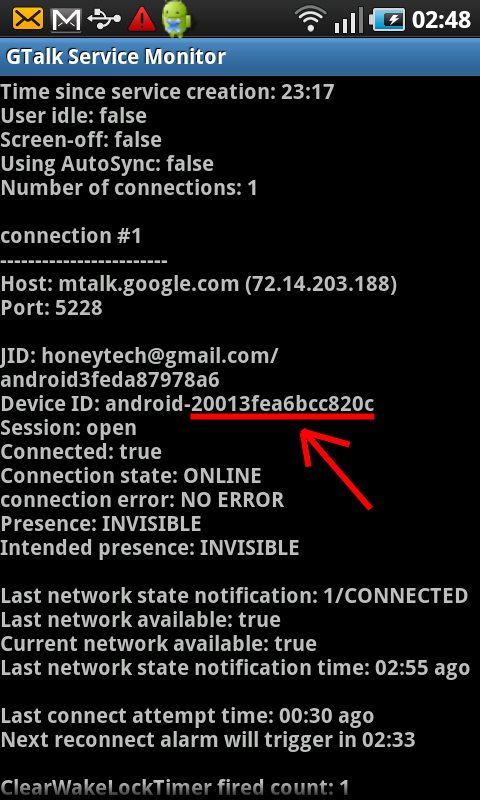
The general info is required. Email and password are belong to a Gmail that is main account on an Android phone. Device Id is the device id of that phone. You can obtain it by press *#*#8255#*#* on your phone. This screen should be shown (please note that the device id doesn’t contain “android-” part).
gtalk service monitor Real APK Leecher, the easiest way to download android apk file from Android Market to desktop
If you cannot get device id with above method, go market and search for Device ID app. It will get it for you.

2. Download apps
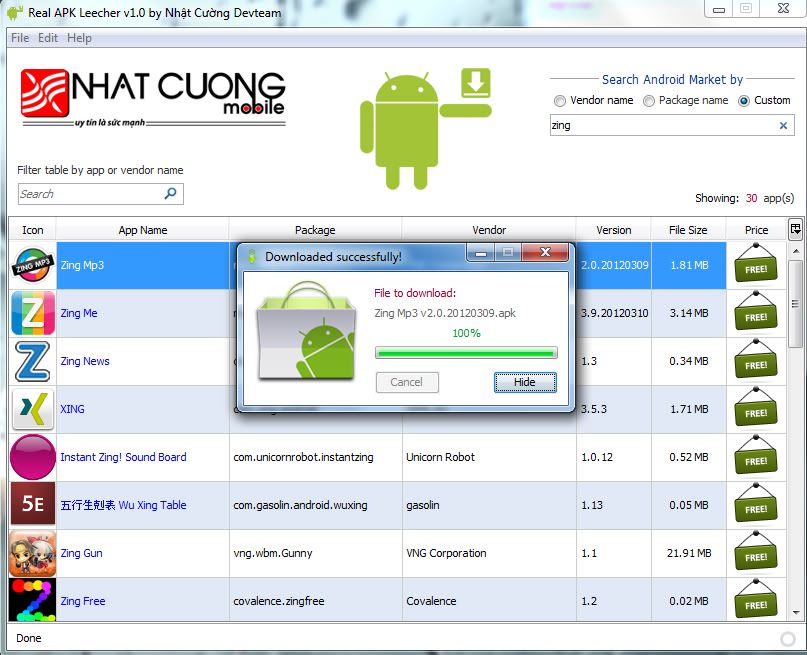
This tool is very easy to use. Just search with proper search term, you’ll get the list of apk files on the table below. Select a row and right-click, then download the app you want.
ralsearchmarket Real APK Leecher, the easiest way to download android apk file from Android Market to desktop

3. Check version of local apk files
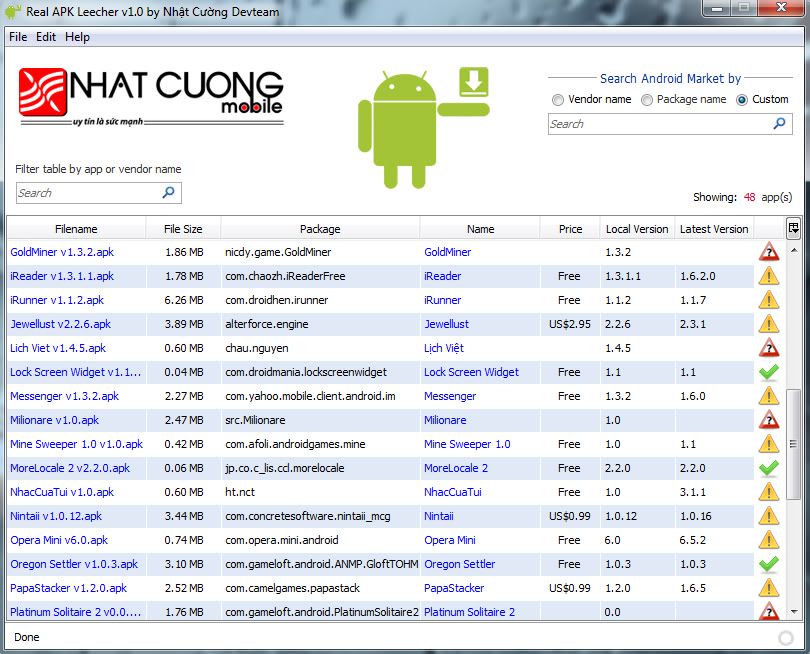
This is new feature on version 1.1.8 which let you compare local version of an apk folder with the version on Google Play. It helps you update your existing apk files easier.
scanfolder Real APK Leecher, the easiest way to download android apk file from Android Market to desktop

4. Batch rename apk files with proper name
You can automatically rename all apk files with file name format option, or manually rename a file by double-click on the filename on the table.

Download